If you’ve ever felt overwhelmed by SEO, juggling content, audits, and on-page SEO improvements alone, you’re not the only one. The good news is that running professional-level SEO without a team has never been easier.
In 2025, one person can now execute what previously required multiple specialists. Search has evolved, workflows have accelerated, and automation covers most operational bottlenecks. Whether you’re a freelancer, indie founder, or consultant, solo SEO is now a practical and highly effective model.
From keyword research to entity coverage, implicit mentions to explicit citations, everything has become more streamlined, and far more intelligent. With platforms like Wellows, you can strengthen AI visibility, measure search engine visibility, and understand how your content performs inside the wider GenAI visibility stack.
How SEO and AI Visibility Will Change in 2026
SEO in 2025 looks very different from previous years, and the shift benefits solo marketers. Search engines now prioritize intent, structure, clarity, and contextual relevance, not keyword density or link volume alone.
AI influences nearly every algorithm update, meaning Google and Bing evaluate how well your content aligns with real user behavior and how it performs across the broader GenAI visibility stack. This includes how AI models interpret your entities, citations, and topical depth.
With Wellows, AI Search Visibility for Freelancers is more accessible. Independent operators can track how their content appears in AI search and optimize it based on how search engines and LLMs interpret topics.
That’s why working without a team is no longer a disadvantage. Lean workflows allow you to move quickly, stay aligned with search intent, and make accurate, visibility-focused decisions without the need for large teams.
How Can I Effectively Implement AI Search Visibility Strategies as a Solo Entrepreneur
Implementing AI search visibility as a solo entrepreneur is less about publishing more content and more about understanding how AI systems interpret, surface, and cite your brand across the GenAI visibility stack. Your goal is to strengthen AI visibility, improve your Citation Score, and ensure that search engines and LLMs consistently reference your expertise when users ask about problems you solve.
Here’s how to approach it with a process similar to how I audit AI visibility using Wellows:
1. Start With Real Query Patterns, Not Keywords
Instead of beginning with keywords, analyze how users frame questions inside AI assistants, SERPs, and conversational search. Study autocomplete, People Also Ask, and AI-generated variants. This reveals the intent clusters where improving AI search visibility will move the needle.
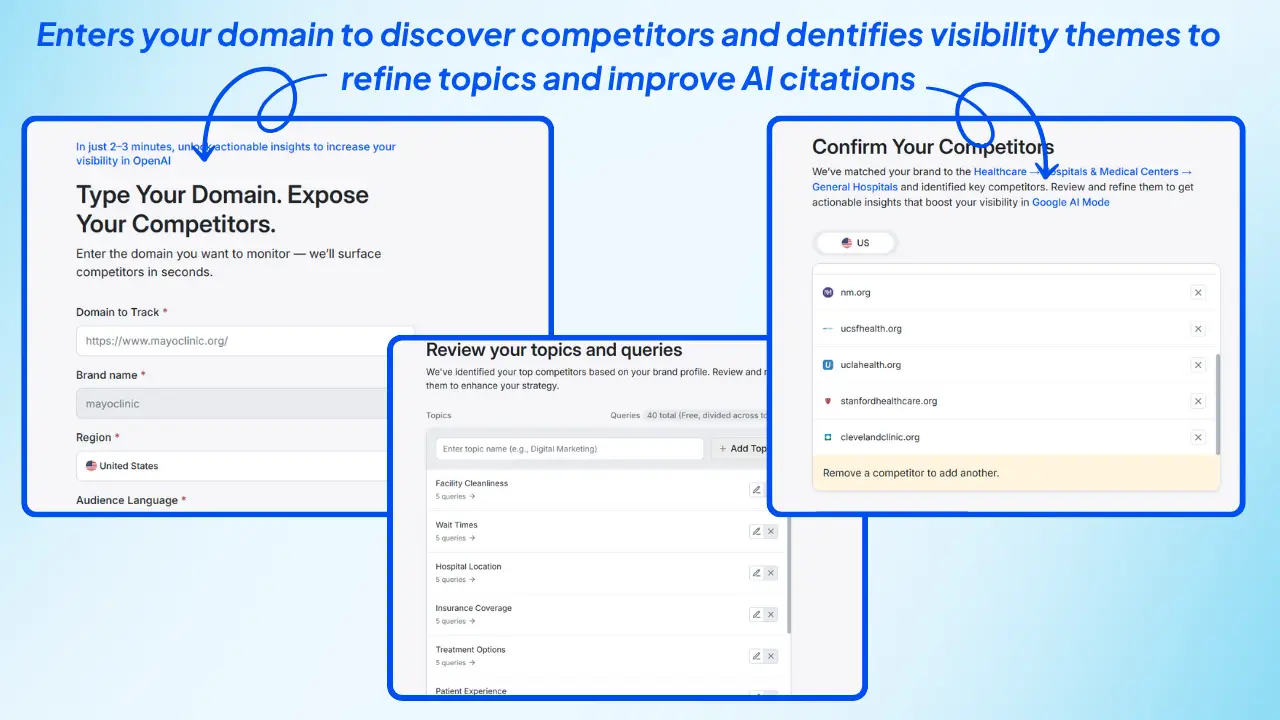
2. Add Your Domain to an AI Visibility Platform
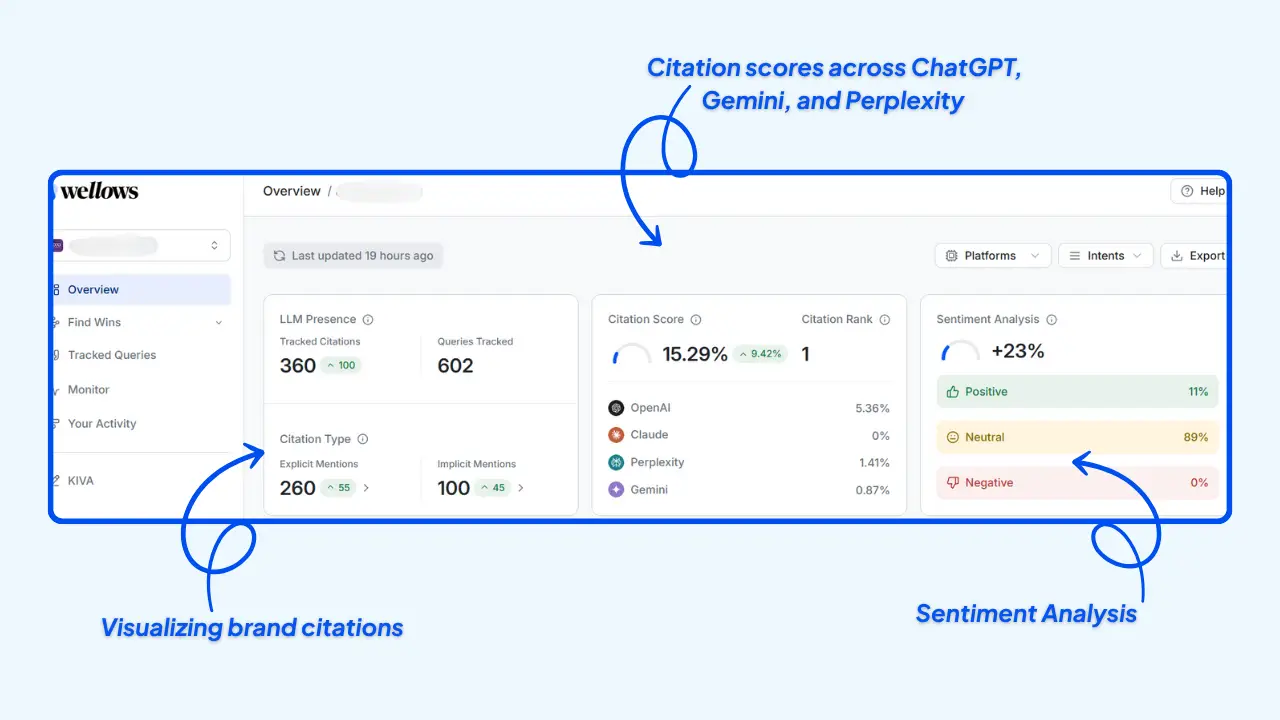
Upload your domain into a platform like Wellows to instantly evaluate how often your brand is cited across key AI systems. For solo operators, this establishes a measurable baseline of your AI visibility and highlights where your content is missing across the GenAI visibility stack.
3. Analyze Your Citation Score & Competitor Positioning
Review your Citation Score and compare it with similar brands or individual creators in your niche. This reveals:
- Which queries mention you
- Where competitors dominate
- Which platforms prefer alternative answers
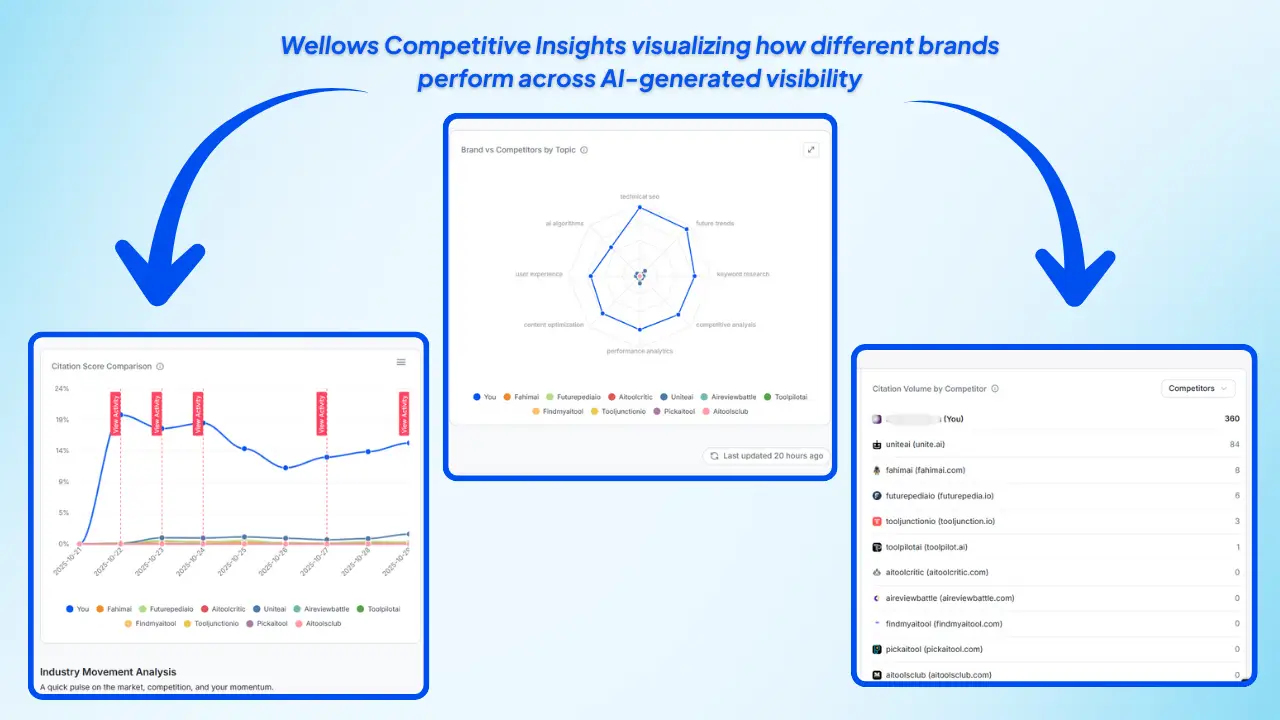
This benchmarking transforms vague assumptions into actionable insight.
4. Review Visibility Themes & Missing Mentions
Wellows groups your domain into relevant categories and identifies visibility themes. These highlight:
- Explicit mentions (credited citations)
- Implicit opportunities (topics where competitors appear but you don’t)
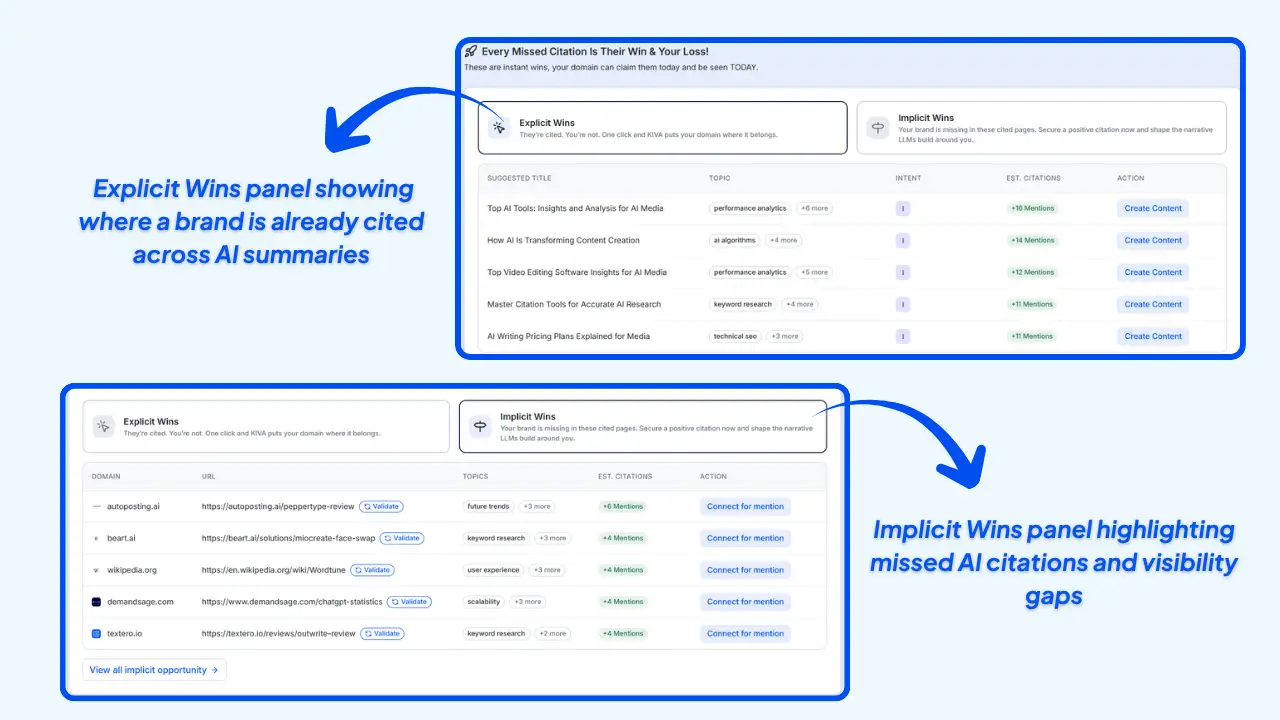
As a solo entrepreneur, each implicit opportunity becomes a structured content idea, outreach angle, or authority-building asset.
5. Optimize Your Core Content for AI Interpretation
Refine your title tags, headings, URL structure, and content hierarchy so search engines and LLMs correctly interpret your expertise. This step directly improves your performance within the broader GenAI visibility stack.
6. Create Depth Content That Aligns With AI Preference Signals
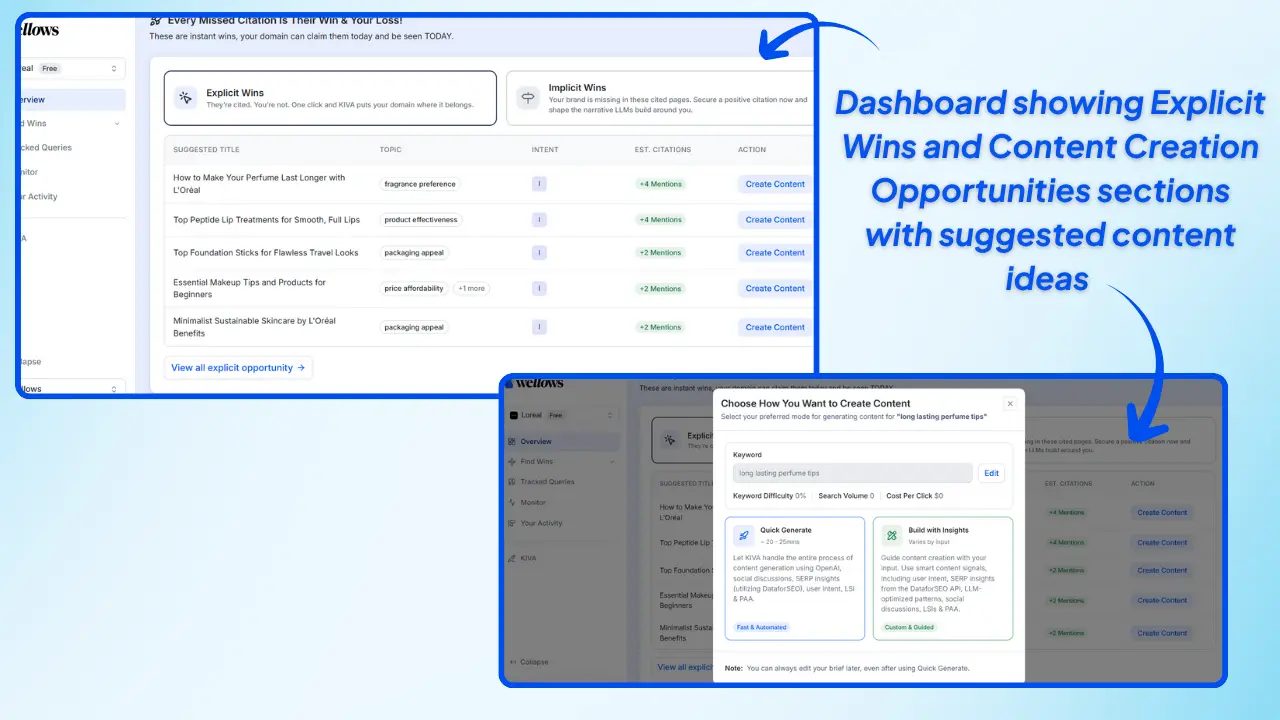
Produce authoritative, insight-focused content, guides, breakdowns, comparisons, that maps to the queries where competitors currently win citations. High-value assets also enhance your trust layer and boost your Citation Score.
7. Build Quality Mentions & Signals That LLMs Trust
Earn backlinks, expert quotes, and contextual references from credible sources. These trust signals influence both traditional rankings and how AI models decide which brands to cite or recommend.
8. Track AI Search Visibility Over Time
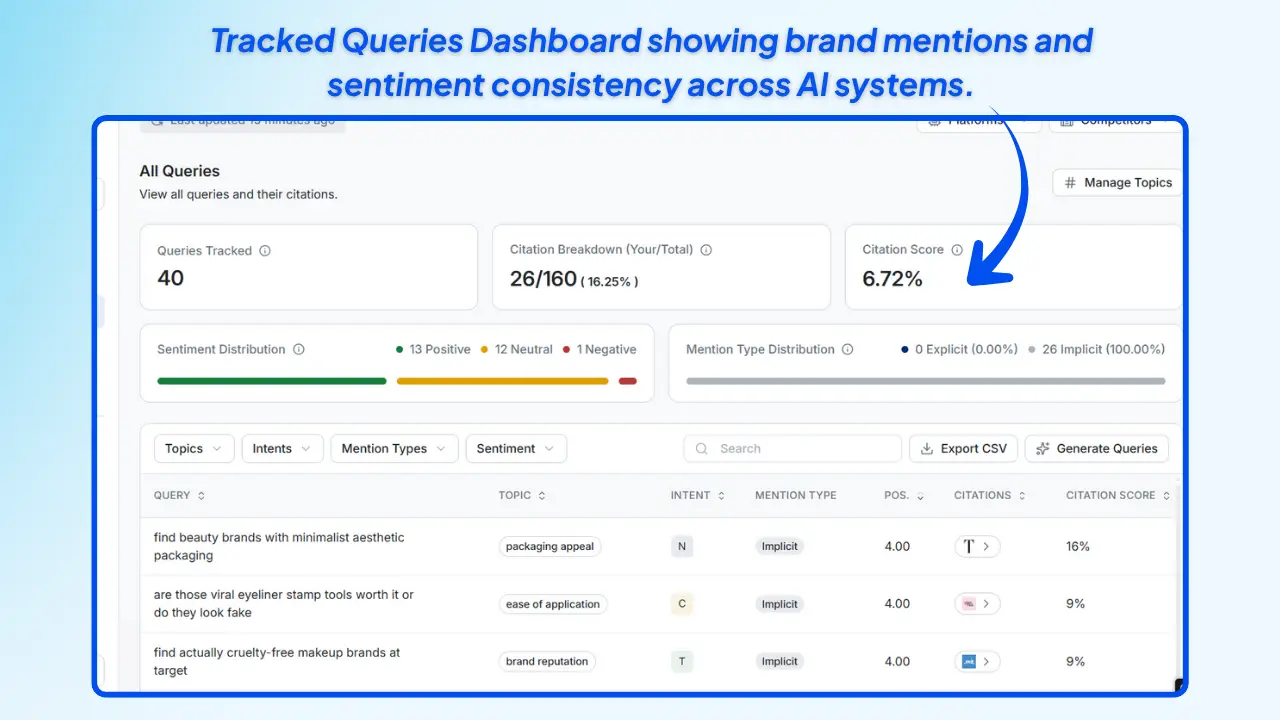
Monitor changes in Citation Score, ranking, and sentiment as you publish content or build authority. Wellows makes this effortless with dashboards that visualize how your visibility improves across major LLMs week-by-week.
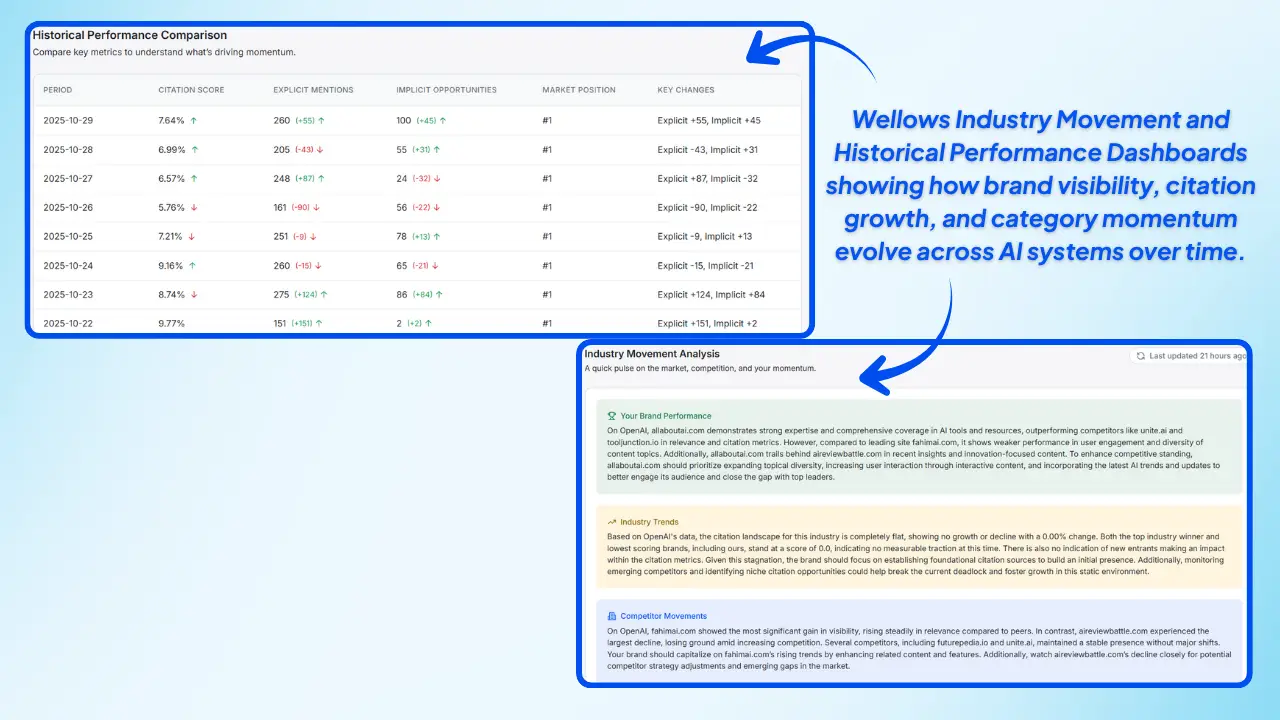
By following this visibility-first workflow, you create a scalable system for improving AI search visibility, strengthening your presence in AI-generated answers, and growing organic traffic, without needing a full team. This is how solo entrepreneurs and Tech startups compete in a 2026 search environment shaped by LLMs, conversational engines, and autonomous marketing platforms.
How do I conduct keyword research without a team
Keyword research in 2026 is no longer about collecting keywords, it’s about understanding how AI systems interpret user questions and how your content can earn visibility across the entire GenAI visibility stack. As a solo entrepreneur, your goal is to uncover topics that boost AI search visibility, improve your Citation Score, and make your brand show up in AI-generated answers.
- Identify Real Questions Your Audience Asks
Start with audience problems, not keywords. Map the questions your users ask across search engines and AI assistants. This gives you the intent patterns that influence both organic visibility and how LLMs surface recommendations.
- Analyze Query Signals Across Search Engines
- Google Autocomplete: Reveals dominant search patterns and phrasing.
- People Also Ask: Shows intent layers and related micro-queries.
- Related Searches: Helps expand your topic clusters.
These signals reflect how AI systems learn and predict user intent , critical for strengthening AI search visibility.
- Explore Communities to Capture Natural Language Queries
- Reddit, Quora, Slack groups: Surface conversational phrasing and trending questions.
- LinkedIn and niche communities: Reveal industry-specific problems your content should answer.
This is the language LLMs adopt, so capturing it improves your visibility inside AI-driven answers.
- Use Free Tools to Validate Demand
- Google Keyword Planner: Confirms real search volume and interest.
- Soovle: Provides multi-engine autocomplete for broader context.
These tools validate whether the topics you discovered truly matter.
- Analyze Competitor Themes Through an AI Visibility Lens
Look at what your competitors rank for , not just in SERPs but also in AI-generated responses. See which themes they dominate and which questions they’re earning citations for. This shows where you need better coverage to improve your Citation Score.
- Cluster Keywords Into AI-Friendly Topic Groups
- Keyword Clustering: Helps you cover multiple query variations with one page.
- Intent Mapping: Aligns each cluster with different decision stages.
LLMs favor depth and completeness, so clusters help you win across search + AI systems.
- Monitor Performance Across Search + LLMs
Use Google Search Console for organic tracking and AI visibility platforms like Wellows to analyze:
- Which queries mention your brand
- Where your content gains or loses visibility
- How your Citation Score evolves over time
This loop ensures your keyword research constantly feeds into your AI visibility strategy.
Even without a team, this AI visibility–focused workflow helps you discover high-impact topics, build stronger content clusters, and gain visibility across both traditional search engines and AI-driven discovery systems.
How Can I Optimize My Website’s SEO Without Technical Expertise
Optimizing your website’s SEO without technical skills is absolutely possible when you shift from traditional checklists to a visibility-first approach. As search and AI systems evolve, simple structural improvements can strengthen both your organic rankings and your AI visibility across the broader GenAI visibility stack.
Here’s a practical, non-technical workflow to follow:
1. Conduct Topic & Keyword Research
Focus on topics and questions your audience asks, not just keywords. Use tools like Google Keyword Planner or Soovle to validate demand, then map those topics to intent-driven pages that improve both search visibility and AI search visibility.
2. Publish High-Value, Helpful Content
Create clear, useful content that solves real problems. Well-structured guides, tutorials, and comparison pages often earn stronger trust signals, improving your Citation Score and how LLMs interpret your expertise.
3. Improve Title Tags and Meta Descriptions
Your titles and descriptions help both users and AI systems understand your page. Include main keywords and make the value clear. Even small improvements can lift click-through rates and increase early visibility.
4. Use Header Tags to Structure Information
Organize every page with H1, H2, and H3 tags. This helps search engines and LLMs map your content into the correct themes, which improves interpretation inside the GenAI visibility stack.
5. Increase Website Speed
Fast-loading pages create better user experiences and support higher visibility. Compress images, use reliable hosting, and minimize heavy scripts. Search engines and AI systems both reward better performance.
6. Strengthen Internal & External Link Signals
Add internal links to help visitors (and crawlers) discover related content. Link to reputable external sources when helpful. These signals contribute to authority and can influence how often AI models reference your pages.
7. Optimize Image Metadata
Use descriptive filenames and alt text. This enhances accessibility and gives search engines clearer context, especially useful when AI models extract facts or attributes from your content.
8. Use Beginner-Friendly SEO Tools
Platforms like Wix, Hostinger, and Squarespace include built-in SEO features such as sitemap generation, basic audits, and schema prompts. Even without technical knowledge, these tools help maintain a healthy site foundation.
By applying these visibility-focused steps, you strengthen your site’s performance in organic search while improving how AI systems interpret, categorize, and surface your content, all without needing technical expertise or a full team.
Creating High-Impact Content Without a Team: Quality Over Quantity
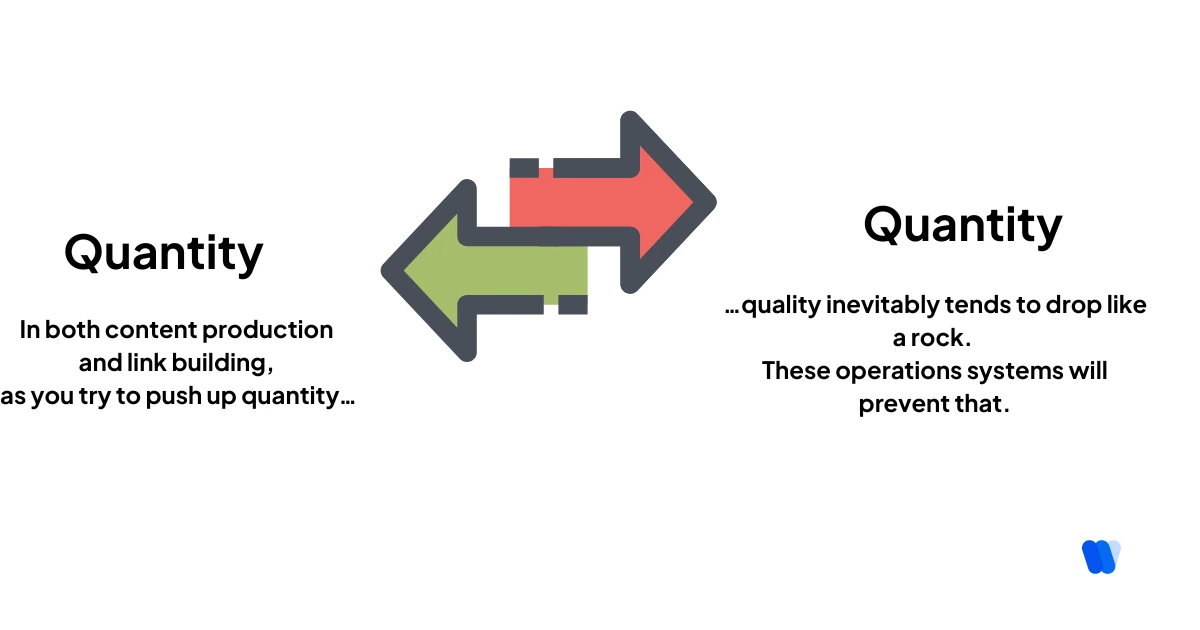
When you’re running SEO without a team, high-impact content becomes your biggest advantage. Instead of publishing frequently, focus on creating depth, clarity, and value , an approach every SEO content creation for solo practitioners guide supports.
Publishing more doesn’t guarantee better visibility. What truly drives gains in organic search and AI search visibility is a well-structured, authoritative piece that answers real questions. One comprehensive article can outperform multiple short posts when it aligns with user intent and fits cleanly into the GenAI visibility stack.
That’s why I prioritize depth over frequency. Tools like Wellows help structure content and ensure key themes are fully covered for AI search visibility. From there, the goal is to write something genuinely helpful , guides, frameworks, templates, or walkthroughs earn the strongest visibility signals in AI search.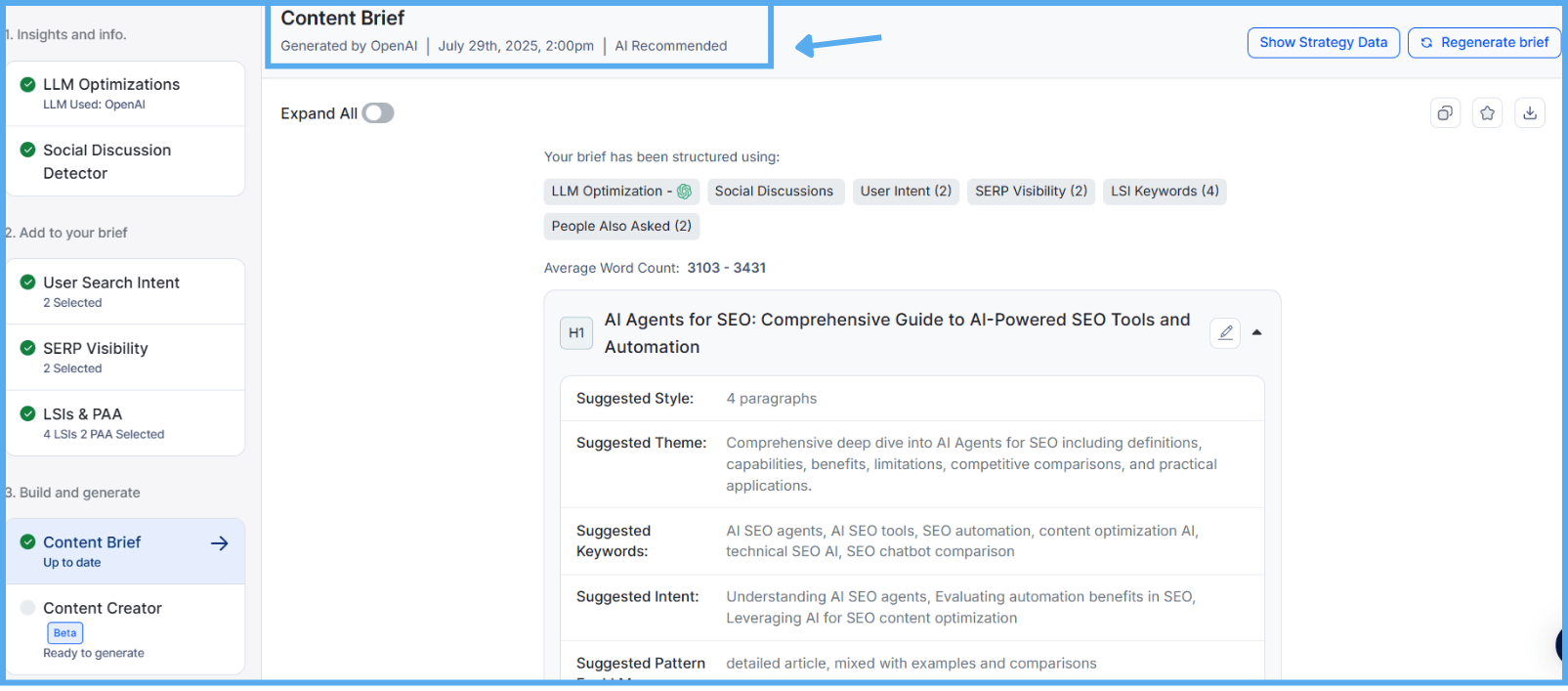
With Wellows’ AI-Optimized Brief Generator, you can build content outlines aligned with user intent, SERP structure, thematic relevance, and AI-driven query patterns. It automatically maps headings, tone, and key entities while analyzing People Also Ask queries across Google, Bing, and Yahoo , ensuring every section is built for both search visibility and AI search visibility.
Once the content goes live, expand its reach through smart repurposing:
- Convert highlights into social posts
- Turn sections into email sequences
- Create carousels, checklists, or lead magnets
For solo operators, this kind of content repurposing saves time and amplifies distribution , while also improving how often your concepts appear in AI-generated responses.
Wellows’ LLM Interpretation Insights show how AI systems understand your topics, entities, and phrasing. This clarity helps you refine content so it aligns with the patterns LLMs use when explaining why startup leads dropped and when generating trusted recommendations and answers.
On-Page SEO: Optimizing Your Content
Strong content performs best when paired with strong structure. On-page SEO ensures search engines and AI systems interpret your page correctly, which is essential for solo workflows.
I always start with core fundamentals: a clear title tag, a precise meta description, and clean header hierarchy. Even a small change , like realigning a title to match search intent , can lift click-through rates by over 5%.
I also assess how users interact with the page:
- Is the core value visible above the fold?
- Are CTAs placed where users naturally look?
- Can someone scan the page and understand it in under 30 seconds?
These micro-optimizations make a major impact when you’re managing SEO without a team.
Wellows’ AI Writting generator help you improve clarity, fix gaps, and strengthen content structure instantly , without leaving the editor , making optimization faster and more consistent.
Technical SEO: Ensuring Site Health
When you’re handling SEO independently, your technical setup must stay clean and stable. Strong technical SEO ensures your website can be discovered, crawled, and interpreted correctly, both by search engines and AI systems that now rely heavily on structured signals to shape results.
I run routine audits using tools like Screaming Frog and Sitebulb as part of a structured technical SEO audit to catch issues before they hurt visibility. The areas I monitor most often include:
- Broken links that disrupt crawl flow
- Mobile usability issues
- Slow load times (I aim for under 2.5 seconds)
I also enable alerts in Google Search Console to detect crawl errors, indexing failures, or schema issues quickly. These automations allow me to maintain site health without spending countless hours fixing unexpected problems.
For solo operators, automation and consistency are essential. A clean technical foundation supports stronger rankings and improves how your pages appear within AI-driven environments across the broader GenAI visibility stack.
Key Components of Technical SEO
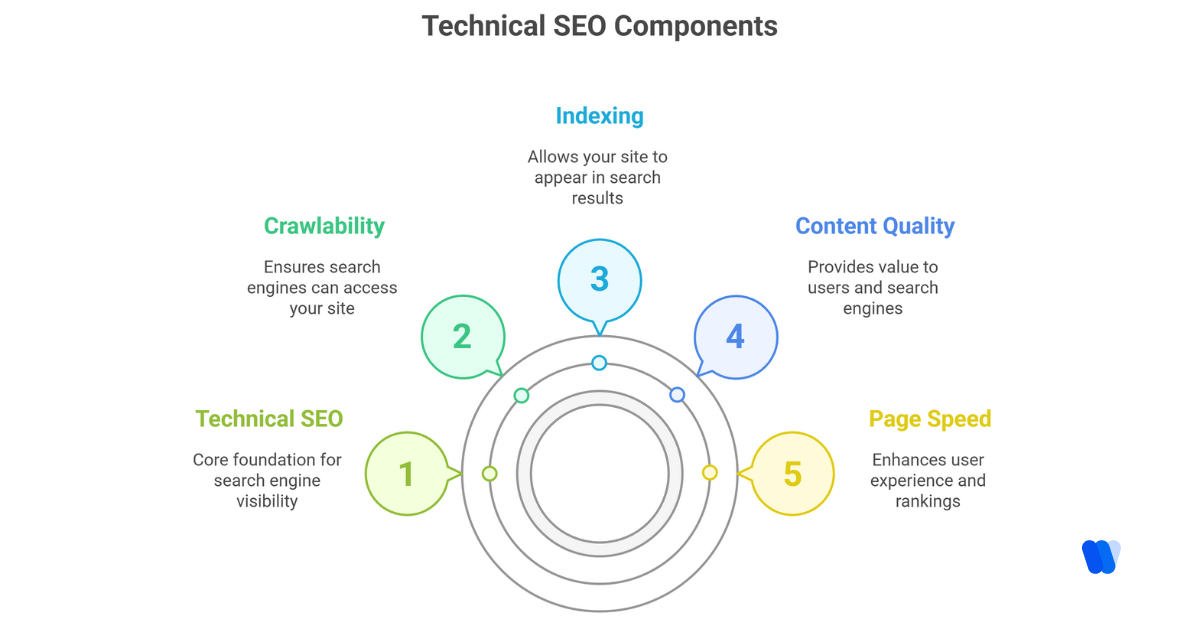
Technical SEO forms the backbone of your visibility. Below are the ten key areas I monitor to ensure search engines and AI systems can interpret my content accurately:
1) Crawlability
Crawlability determines how easily bots navigate your website. If bots can’t reach your pages, nothing else matters, your content won’t appear in search or AI-generated responses.
Key Elements:
- XML Sitemaps: Your site’s roadmap, helping search engines discover and prioritize pages.
- Website Structure: A simple hierarchy reduces crawl depth and enhances user flow.
2) Indexing
Before publishing, I check robots.txt settings and canonical tags to ensure search engines never index the wrong version of a page.
Key Factors:
- Robots.txt: Controls crawler access, misconfigurations can block entire sections.
- Canonical Tags: Prevent duplicate content by signaling the preferred URL.
- Mobile-Friendliness: Since Google uses mobile-first indexing, responsive design is essential.
3) Content Quality
Technical accessibility is meaningless without content that delivers value. Search engines and LLMs reward depth, clarity, and strong entity coverage.
Focus Areas:
- Clear, structured content built around user intent
- Readable formatting using headers and visuals
- Avoiding thin or duplicate content
4) Page Speed
Speed influences user experience, rankings, and how AI systems evaluate content reliability. Even one-second delays can reduce conversions and visibility.
Ways to Improve Speed:
- Compress and minify CSS, JS, and HTML
- Use caching and compression like GZIP
- Adopt a strong CDN for global performance
- Optimize all images for web
5) Structured Data
Schema markup adds context to your content. It improves visibility inside SERPs and helps LLMs interpret information more accurately, strongly influencing AI visibility.
Examples:
- Products
- Reviews
- FAQs
- Events
- How-To
Use Google’s Structured Data Markup Helper to implement and validate schema.
6) Internal Linking
Internal links act as a navigation system for both users and crawlers. They help distribute page authority and increase discoverability.
Best Practices:
- Link to important pages from high-traffic areas
- Use descriptive anchor text
- Avoid orphaned pages
7) Redirects and Canonicalization
Redirection and canonical tags ensure bots and users land on the correct version of your content.
Types to Know:
- 301 Redirects: Permanent moves to preserve ranking signals
- 302 Redirects: Temporary variations
- Canonical Tags: Consolidate ranking power across duplicates
Always test redirects to prevent loops or dead ends.
8) Security (HTTPS)
Security signals trust. HTTPS isn’t optional, it affects rankings and user confidence.
Steps to Secure Your Site:
- Install SSL certificates (Let’s Encrypt is free)
- Redirect all traffic to HTTPS
- Update internal links to HTTPS
- Keep plugins and themes updated
9) Ongoing Monitoring and Maintenance
Search engines and AI systems evolve quickly. Regular technical checks ensure your site keeps up.
Monitoring Checklist:
- Use Google Search Console for indexing insights
- Audit regularly with Screaming Frog, Ahrefs, or Sitebulb
- Monitor structured data, server responses, and broken elements
10) Broken Links
Broken links disrupt user experience and interrupt crawl paths, both of which harm visibility.
How to Fix Them:
- Scan periodically with Broken Link Checker, Ahrefs, or Semrush
- Replace or redirect outdated URLs
- Create custom 404 pages that guide users back to valuable content
Keeping links clean ensures smooth navigation and strong crawlability, and prevents search engines and AI models from hitting dead ends.
Leveraging AI Tools for Efficiency
Leveraging artificial intelligence (AI) tools today is one of the fastest ways for solo operators to streamline workflows, automate manual tasks, and strengthen visibility across both search engines and AI-driven ecosystems. The right AI search visibility tools help you understand how your content appears inside the evolving GenAI visibility stack, and how to improve it without a full team.
What Are the Best AI Search Visibility Tools for Individuals Managing Their Own Websites
Managing your visibility across search and AI platforms becomes dramatically easier when you use tools designed to provide insights, automate analysis, and highlight content gaps. Below are the top solutions worth exploring:
Did you know?
1. Wellows
Wellows is an AI visibility platform built to help you measure, improve, and monitor your visibility across AI systems and search engines. It tracks Citation Score, identifies implicit and explicit mentions, benchmarks your brand in the GenAI visibility stack, and highlights opportunities to improve how often AI models surface your content.
2. Profound
Profound offers AI-powered research insights, helping you analyze topics, competitors, and emerging trends quickly. It’s ideal for identifying high-impact content angles and understanding conversational query patterns used by AI assistants.
3. Scrunch AI
Scrunch AI streamlines keyword discovery, topic expansion, and entity analysis, making it easier to create content that aligns with how AI systems interpret semantic relationships and emerging search behavior.
4. PromptWatch
PromptWatch monitors AI-generated outputs across multiple models to help you understand how your brand, competitors, or topics appear in AI answers. It’s especially useful for tracking shifts in AI search visibility and identifying which prompts or themes require stronger coverage.
5. Xfunnel
Xfunnel provides AI-driven insights for content performance, funnel behavior, and user intent patterns. It helps creators and solo marketers refine messaging and structure pages in a way that supports both organic search performance and AI-powered discovery.
These AI search visibility tools work together to support everything from technical diagnostics to AI-driven strategic insights. They’re particularly powerful for solo entrepreneurs who need clarity, automation, and data-backed direction without managing a full marketing team.
AI Tools for Scaling AI Visibility (and Why I Use Wellows)
When you’re working solo, you don’t need more tools, you need the right platform that aligns with how search and AI systems work today. Most AI writing or SEO tools can help you generate content, but they cannot tell you how often AI models mention you, what tone they assign to your brand, or why competitors appear more frequently in conversational answers.
That’s exactly why I use Wellows.
Traditional SEO platforms were built for rankings, backlinks, and keyword volume, not for the AI search era. Wellows operates as an AI visibility platform that measures how your brand, topics, and content show up across AI engines and the broader GenAI visibility stack.
It helps solo marketers understand what AI systems “think” about their brand and what’s needed to increase visibility in both search and LLM-driven responses.
Did you know?
- AI Citation Tracking – Wellows reveals how often your brand, services, or topics appear across ChatGPT, Gemini, Bing, and Perplexity. This goes far beyond keywords, it shows actual AI answers.
- Implicit & Explicit Mentions – It identifies not just credited brand mentions, but also unlinked or uncredited references where your value appears but your name is missing. Those become immediate content or outreach opportunities.
- Citation Score – Wellows combines AI citations, share of voice, and sentiment to calculate your visibility strength across AI systems, something no traditional SEO tool offers.
- AI Search Visibility Benchmarks – Instead of comparing SERP rankings, Wellows benchmarks your visibility against real competitors that LLMs prefer in their answers.
- Explicit vs Implicit Wins – The platform shows where competitors win citations, where you’re missing, and which topics require GEO-optimized content or third-party mentions.
- Query Intent Clustering – Wellows groups AI-driven questions into actionable themes, helping you understand what users and AI assistants care about most, and which content clusters to build next.
- Real-Time Sentiment Tracking – It analyzes tone across AI systems so you know whether AI assistants describe your brand positively, neutrally, or with missing context.
- Topic & Content Playbooks – Instead of guessing what to create next, Wellows generates data-backed content opportunities that improve AI search visibility and drive organic growth.
- Autonomous Marketing Alignment – Everything inside Wellows is designed to help individuals scale without a team, combining research, visibility insights, topic discovery, and content strategy in one workflow.
The difference is simple: Other tools help you create content. Wellows helps you get discovered.
Local SEO: Capturing Nearby Audiences
When I’m working with a local business, or building one of my own, I’ve learned that local SEO without a team in the US is where early momentum grows fastest. Local buyers search with intent, often needing a solution the same day, which makes accuracy and visibility essential.
I always start by optimizing the Google Business Profile. It builds map visibility, supports proximity-based rankings, and now influences how AI models summarize local businesses in conversational responses.
Then I make sure my NAP details (name, address, phone) are consistent everywhere, directories, listings, citations, and even social bios. Consistency strengthens both traditional local SEO and your local AI search visibility, since LLMs often pull business details from structured listings.
For content, I build location-specific service pages targeting natural phrases like “wedding photographer in Austin” instead of generic keywords. This helps you rank in SERPs and improves how AI assistants match your brand to regional queries.
If you’re working solo, the key isn’t doing more, it’s showing up with accuracy, consistency, and updated local signals across search and AI ecosystems.
Link Building Without a Team: Quality Over Quantity
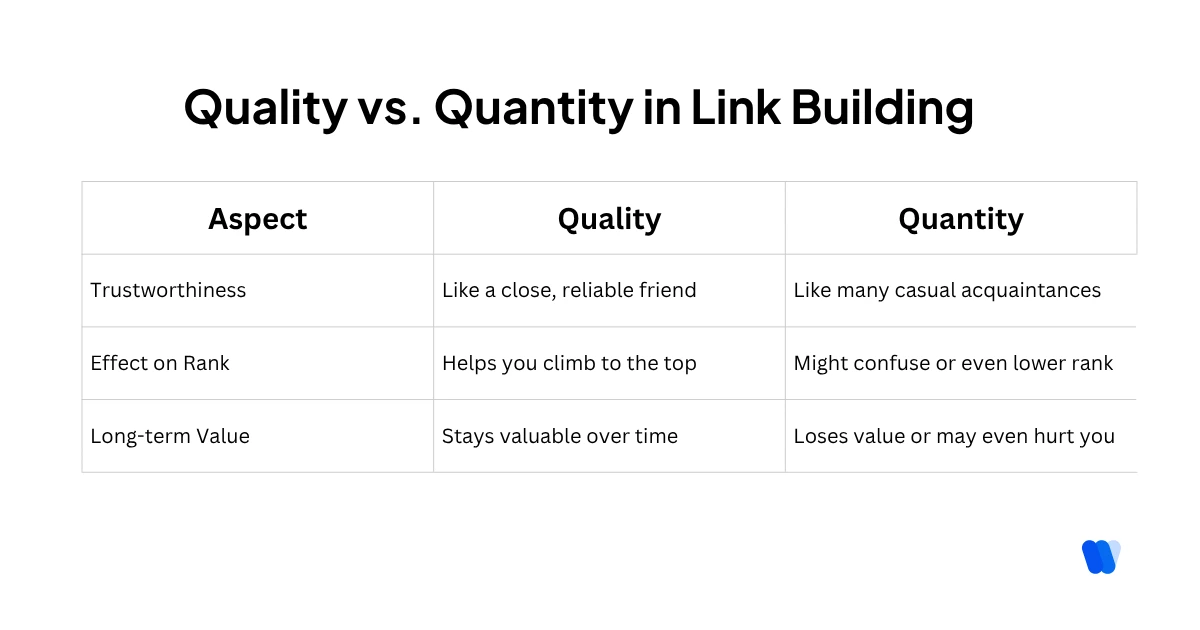
When it comes to backlink strategies for individuals, quality always wins. A single high-authority backlink often contributes more to visibility than dozens of low-value links, and in 2026, backlinks also influence how AI systems determine authority when generating answers.
I focus on creating assets that naturally earn links: unique insights, templates, original research, and collaborations. These not only improve traditional SEO but increase the likelihood of earning explicit citations in AI systems and improving your overall Citation Score.
Platforms like HARO and SourceBottle still work well for solo operators. They connect you with journalists looking for expert input, earning editorial backlinks that boost both search rankings and the trust layer AI engines use to determine whether you should appear in their answers.
Quality links support your visibility everywhere, not just in SERPs but across the broader GenAI visibility stack.
How often should I update my website’s content for SEO
Updating your content is essential for staying competitive in both search results and AI-generated answers. Today, it’s not only about Google recrawls, AI systems also refresh their knowledge, reassess authority, and update how they describe brands over time.
Here’s how I align my update cycles with both SEO and AI search visibility:
Content Types & Ideal Update Frequency
- Blog or News Posts: Refresh weekly or bi-weekly. New content signals activity to search engines and keeps your themes fresh for AI assistants during answer regeneration cycles.
- Service Pages / About Pages: Update every 3–6 months. AI models rely heavily on these pages to understand brand positioning and entity relationships.
- Product or Pricing Pages: Update immediately after changes. Inconsistent product info reduces both conversion trust and AI accuracy.
- Long-Form SEO Guides: Refresh every 6–12 months, or sooner if rankings dip. Updated guides help retain authority and reinforce the signals LLMs use when selecting explicit citations.
Additional Considerations:
- Industry Speed: Fast-changing markets require faster updates so search engines and AI systems don’t rely on outdated information.
- Visibility Monitoring: Track drops in traffic or Citation Score; both indicate your content may be losing relevance in search or AI answers.
- User Behavior: If bounce rates increase, AI-generated summaries or SERP snippets may be mismatched, often solved by updating the content.
My ongoing maintenance workflow:
- Weekly: Track rankings, AI citations, and visibility shifts.
- Monthly: Check broken links, structured data, and page freshness.
- Every 3–4 Months: Full content + AI visibility audit.
- Yearly: Review all evergreen content for alignment with updated AI and search trends.
Regular updates help you stay competitive across SERPs, and maintain a strong presence inside AI-generated recommendations.
Common SEO Mistakes to Avoid When Working Alone
Managing SEO independently means you need to avoid mistakes that impact not only rankings, but also your visibility in AI-driven search results. Here are the biggest pitfalls that harm both SEO and AI search visibility:
- Neglecting Keyword + Query-Pattern Research
AI systems rely on conversational queries. Ignoring these patterns means missing the terms real users type, and the prompts LLMs use to decide which brands to cite. - Keyword Stuffing
Overusing keywords harms readability and reduces your chances of being referenced in AI-generated answers, where clarity and expertise matter most. - Producing Thin or Duplicate Content
Low-value content is ignored by search engines and AI engines alike. LLMs prefer pages with structured depth and strong entity coverage. - Ignoring On-Page Optimization
Missing metadata weakens both SERP performance and AI context extraction, which reduces your likelihood of appearing in AI answers. - Weak Mobile Optimization
AI assistants often prioritize mobile-friendly sources in their reasoning, especially when summarizing local or service-based content. - Overlooking Local SEO
Inconsistent NAP signals confuse both search engines and AI citation systems that rely on structured business data. - Poor Internal Linking
AI models use internal architecture to understand topic relationships. Weak linking reduces both crawlability and contextual understanding. - Not Using Analytics or Visibility Tools
Ignoring data, especially Citation Score, sentiment, and AI visibility metrics, leaves you blind to how AI systems interpret your brand. - Ignoring UX and Page Performance
Slow, unorganized pages reduce engagement and decrease your chance of being cited in AI recommendations. - Failing to Update Content
Outdated content drops in rankings and loses visibility during AI answer refresh cycles.
By avoiding these mistakes, you strengthen both organic search performance and your appearance across the GenAI visibility stack.
Common SEO Challenges Small Business Without Team
Small business owners without dedicated SEO teams often encounter several challenges when trying to enhance their online visibility. Below are some of the most common obstacles and how they impact overall SEO performance:
1. Limited Time and Resources
Managing SEO requires ongoing efforts such as content creation, keyword research, and technical maintenance. For small business owners juggling multiple responsibilities, allocating sufficient time and resources to these tasks can be daunting.
2. Lack of Technical Expertise
Effective SEO involves understanding complex elements like website structure, mobile optimization, and search engine algorithms. Without specialized knowledge, small business owners may struggle to implement these technical aspects correctly.
3. High Competition
Competing against larger companies with dedicated marketing teams and substantial budgets can be challenging, especially for popular keywords. This competition can make it difficult for small businesses to achieve prominent search engine rankings.
4. Inconsistent Content Creation
Search engines favor websites that regularly publish high-quality content. However, producing consistent and engaging content can be time-consuming and may require skills that small business owners lack.
5. Neglecting Local SEO
Many small businesses overlook the importance of local SEO, which is crucial for attracting nearby customers. This includes optimizing Google Business Profiles and managing local listings to improve local search visibility.
6. Difficulty in Building Quality Backlinks
Establishing backlinks from reputable websites is essential for SEO success. Small business owners may find it challenging to develop a strategy for acquiring high-quality backlinks, which are key for boosting site authority.
7. Keeping Up With Algorithm Changes
Search engine algorithms are continually evolving. Staying informed about these changes and adjusting SEO strategies accordingly can be overwhelming without dedicated personnel or access to up-to-date insights.
Addressing these challenges often requires a strategic approach , prioritizing tasks, seeking professional assistance when necessary, and utilizing available tools to streamline SEO efforts. With consistency and focus, small business owners can still achieve strong online visibility even without a full SEO team.
Read More Articles
FAQs:
For AI-driven visibility, understanding mentions, citations, sentiment, and brand positioning inside AI answers, the most important platform for individuals is Wellows, an AI visibility platform built to measure and improve AI search visibility across ChatGPT, Gemini, Bing, and Perplexity.
Key Takeaways for Running SEO Without a Team
- Solo SEO isn’t about doing everything yourself, it’s about choosing high-leverage actions and staying focused.
- Independent SEO strategies work best when you prioritize clarity, intent alignment, and technical consistency.
- Automation handles repetitive tasks, freeing you to focus on judgment, creativity, and strategic decision-making.
- Precision beats volume: one well-aligned, high-impact page can outperform ten unfocused pieces.
- Visibility now extends beyond rankings, AI systems must interpret, cite, and reference your brand accurately.
- AI search visibility, Citation Score trends, and implicit/explicit mentions show how models perceive your expertise.
Using an AI visibility platform like Wellows helps you uncover gaps, track your authority across the GenAI visibility stack, and turn every piece of content into a stronger asset for growth.

![AI Visibility for B2B Marketing Agencies: The Shortlist-Defense Playbook [2026]](https://staging.wellows.com/wp-content/uploads/2026/06/ai-visibility-b2b-marketing-agencies.webp)